



468x60 Ads

Buanglah sampah pada tempatnya. Pabila sampah tiada, kena ceria main warnet. Hary Irfantri, 2012
Demo image Demo image Demo image Demo image Demo image >
Showing posts with label Media. Show all posts

PowerDVD 12.0.1618.54

0 comments


PowerDVD


If you are looking for an program that brings support for all multimedia files that you have on your computer and gives you the ability to play and view your complete collection of music, videos and photos you need to consider PowerDVD that delivers fantastic tools for this purpose. Installation takes time and there will be a large number of components installed by this application, keep in mind that at the end it will offer you to install Google Toolbar but you can decline it because you do not need it for this application to work properly.
When you start this software product you will be greeted with a modern and nitely organized user interface that delivers all the main functions on colored tabs. After you add and open an file you will be getting all the necessary controls like start, pause, stop, etc.
There are large number of fantastic features that PowerDVD brings and you can use this application as a slideshow viewer, audio player with playlist, search scenes on a DVD, and much more. With integrated YouTube player you can search for videos from this video website and play it directly in this program
Among other features you will be getting CPU/GPU hardware acceleration that will also allow you to watch all your Blu-ray videos in fantastic quality. This is important because these movies are large and its reproduction needs a strong machine.
It would be a waste of time mentioning the formats supported by PowerDVD because this powerful application gets along with the majority of photo, video and audio formats on the market, not to mention that it’s a perfect tool to play HD content. Plus, it has the ability to work with multiple removable devices, including Apple and Android mobile phones and tablets.
If you need an powerful application that will enable you to watch and listen almost all files on your computer. With great looking interface and great tools PowerDVD is ideal choice and a must have program in your collection.

Free download PowerDVD 12.0.1618.54

Size: ~ 145 MB

iMacsoft Free DVD Ripper For Windows is The Best You Can Get For Free

0 comments

iMacsoft Free DVD Ripper is a totally free DVD ripping program for Windows with features usually seen only in commercial products.
I have reviewed a fair number of DVD ripping programs in the past – a majority of them happens to be paid software. When compared to freeware DVD ripping programs, the commercial programs always had an edge over the free ones. They always had a better interface, had exhaustive support for media file formats and built in profiles for different portable devices and media players. I was eager to see a free DVD ripper that was at least half as decent as the paid ones.
imacsoft-dvd-ripper
iMacsoft Free DVD Ripper is not half as decent – it’s a full replacement for every expensive DVD ripping program out there. The software comes with fantastic support for portable devices, user configurable video settings, a video trimming tool, and other features which we shall see shortly.
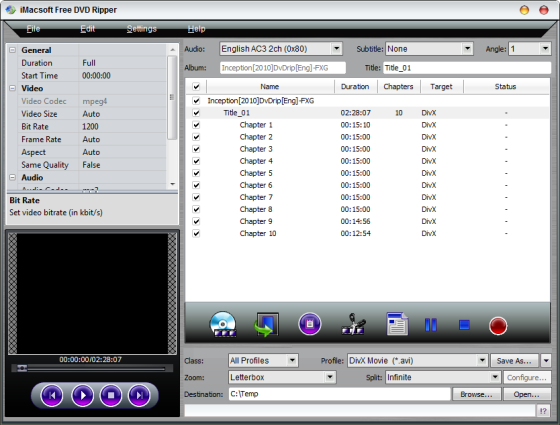
iMacsoft Free DVD Ripper can rip videos from either a physical disc, a disc image or a DVD folder on the hard drive. Just load the DVD or DVD folder into the program and it will automatically list all available titles and chapters on the disc. If the disc contains multiple angles, a feature typically found on porn DVDs, you can extract them too. No other DVD ripping program that I’ve tried till date offered this function.
imacsoft-dvd-ripper2
The next step would be to select the output video format. These are grouped into common video, common audio, iPhone, iPad, PS2, PS3, mobile phone, Windows mobile etc. Each of these groups contain multiple different formats. Practically, all video formats are supported.
If you intend on ripping a DVD and burning it again on to a disk, you can choose to split the video file into 650 MB, 700 MB, 4.7 GB or any custom sized chunks. The video trimming tool lets you set a start and end position on the video file, and only the marked segment will be ripped. This is useful to get rid of advertisement at the beginning of the video and end credits at the end. This in turn reduces the file size of the ripped video.
You can also choose the zoom level – letterbox, pan and scan or full.
On the left, is a small preview window which is basically a video player that lets you preview the video files before ripping. Above the preview window, you will find the video settings. These can be directly clicked on and edited. You can change the video size, bit rate, aspect ration, frame rate, and quality (variable or constants bit rate).
Once you have gone through the above steps, all that remains is to click on the red button to commence ripping.