



468x60 Ads

Buanglah sampah pada tempatnya. Pabila sampah tiada, kena ceria main warnet. Hary Irfantri, 2012
Demo image Demo image Demo image Demo image Demo image >

Firefox 12 Released, Gets Benchmarked Against Chrome 18

0 comments

Firefox Wallpaper fire

Every Firefox release brings something exciting and new to the table. Firefox 12 does not, for those who are expecting something like the previous versions. There has been no new feature addition, worth mentioning! So this time around we have focused on the performance of the browser against its main rival Google Chrome, Firefox 12 vs Chrome 18 in various scenarios including traditional browser benchmarks.

So, What’s new?

Nothing, to be frank enough! But the release is a worthwhile considering the amount of bugs fixed and the performance improvement. Nevertheless there are minor improvements internally which are pretty hard to notice in day to day usage and for non developers. To begin with there is only one (really) “new” feature , which is the implementation of a new Mozilla service to bypass UAC prompts in Windows Vista and above, whenever you update your browser. Google Chrome has implemented it long back, but it involves a lazy trick of installing all your browser updates to the User folder instead of regular Program Files. From now on you will get UAC prompt only when you install Firefox for the first time. When updating later, Mozilla Maintenance Service will take charge of it replacing UAC. By later this year, Mozilla expects to make the automatic browser updates completely silent, like Chrome.

Minor Improvements include:

  • Now page source includes line numbers as well, which must be helpful for developers obviously. Too bad they took a while to implement this.
firefox page source
  • WebGL performance on Mac OSX has been improved significantly.
  • URL’s pasted in the download managers are now downloaded automatically.
  • It is now easier to locate the search results in Find in Page option. Though I prefer Chrome for this function. Firefox needs to improve its search in page even more.
  • Improvements to various built in developer tools like Web Console 3D page inspector, Style Editor and more.
  • Experimental support for ECMAScript 6 Map and Set objects has been implemented in this release.
  • HTML5 Video Controls are improve now, and feature a full screen option.
  • Lots of Security and bug fixes
Note that Firefox does NOT support h.264 format for encoding HTML5 videos as of now, due to Mozilla’s reluctance to adapt to this standard which is wrangled in numerous patents and Mozilla’s adherence to Open Web standards. It will be better for users if Mozilla supports this format as it provides superior compression than ogg theora
Download: Firefox 12 [15.6 MB]

Benchmarks (Firefox 12 vs Chrome 18)
firefox 12 vs chrome 18
Here comes the fun part. Several queries have been raised over the Web with the increasing popularity of our Firefox article series over how the data is collected. So let me take time to explain the rig and the procedure:
The Machine is HP G42 with Core i3 (1st gen) clocked at 2.4 GHz, 6 GB DDR3 of 1066 MHz RAM, ATI Mobility Radeon 512 MB GDDR3 graphics and a 5400 RPM Western Digital Hard drive. Hardware Acceleration was turned on in both Firefox and Chrome
I ran the older version of Google v8 (version 6) benchmark this time to maintain harmony with previous browsers’ scores . Sunspider and Kraken were at their respective latest versions. I took the best of each browser score after running each benchmark thrice to avoid accusations of “biasing the article towards Firefox”.

Firefox 12 vs Chrome 18 : Showdown time

Sunspider Performance

Sunspider is one of the most trusted benchmarks for Web browsers. Sadly this time Firefox has regressed a bit, and continuing the trend from Firefox 11 the performance has dropped a bit. Chrome on the other hand has improved quite a lot from its previous version and manages to beat Firefox handily in this browser intensive JavaScript benchmark.
Firefox vs Chrome sunspider benchmarks

Kraken Performance

Kraken is another browser intensive benchmark by Mozilla, Kraken focuses on much more realistic workloads than Sunspider or V8. Kraken in a way provides a clear view of realistic workloads pushing the browsers limits. Chrome 18 almost demolishes its predecessor and all the recent Firefox release with a stunning score of 3974. Firefox 12 on the other hand fell behind all others by a noticeable margin.
Firefox vs Chrome kraken benchmarks

Google V8

This has been one of the strongholds of Google Chrome’s performance. V8 is the JavaScript engine which ships with Chrome, so obviously one would expect Chrome to perform favourably. Surprisingly this time around both Firefox and Chrome have regressed quite a bit. There were times when the the performance parity with Chrome  would be quite a lot, but Firefox needs even more work in this regard as well.
Firefox vs Chrome v8 benchmarks

Real World Metrics : Chrome the memory monger

If your planning to jump to Chrome bandwagon based on the above benchmarks, hold your guns because the above browser benchmarks barely indicate any real world usage. It is time to check out how much system resources does the two browsers consume on a moderately heavy usage.
For the memory consumption tests I opened the following 10 tabs which I surf usually as my daily routine: Techsplurge, Gmail, Facebook, Twitter, OMGUbuntu , YouTube with a 360p video being played in Flash, Rotten Tomatoes, Phoronix, Google Reader, and a Google search results page.
Firefox vs Chrome memory consumption
Errata : I had not noticed plugincontainer.exe in the earlier memory benchmarks, which is basically the Mozilla container for browser plugin. I noticed it consumed around 100 MB for 360p video. Because this process is entirely separate from Firefox processes, I missed out on this from process explorer. I have added 100 MB for previous Firefox iterations’ memory results  to compensate this.
Interestingly Chrome 18 reported to be using 1.25 GB of memory when I checked from its internal task manager. However upon totalling the memory consumed by each of the chrome.exe processes, it turned out to be 1.7 GB .
Chrome seems to be munching more memory with every release. There are numerous arguments in the wild web about why Chrome consumes so much of memory , but one must clearly note that no matter what Sandboxing or process separation for each tab. Chrome uses a heck lot of memory. This basically renders your PC useless if you wish to do anything apart from browsing on Chrome when you are on a low end PC.

CPU Usage

The CPU usage across the two browsers were the same almost , with the usage hovering around 5 – 7% in each browser. If you are smart you would have guessed that Adobe Flash was the main factor contributing to the CPU usage. But overall, both the browsers manage to be impressively low when it comes to CPU usage.

Which browser should I choose now?

I am huge Firefox fan, but both Chrome and Firefox are great browsers in their own respects and are helping a great deal to make the web better. Here is why you would choose Firefox or Chrome

Firefox

  • You want a fast browser which does not eat your RAM for breakfast.
  • You work with lot of tabs open.
  • You want a lot of customizations in your browser and use loads of add-ons.
  • You are bothered about your online privacy

Chrome :

  • You want the fastest browser on the planet .
  • You do not open  many tabs while browsing.
  • You have a fairly powerful machine and/or don’t bother about the resource usage of your browser.
  • You do not care much about your privacy and do not mind Google collecting user data.

Conclusion

Sadly for me, this one has been quite a mediocre Firefox release when it comes to benchmarks and new features introduced. However this release was necessary as it gave more room for Mozilla to fix important bugs and security issues. With major new features like a completely overhauled UI , improved download manager , web apps integration coming in later releases, it will be worth the wait hopefully. Chrome on the other hand has improved on every other aspect apart from Memory optimization. Do feel free to share your opinion about Firefox 12 vs Chrome 18.

Get Mac OS X Launchpad for Windows with WinLaunch

0 comments

I have been reviewing many free apps for Windows, most of them do fulfil their purpose just right. But there comes a time when you discover a ultra cool app which is rough around the edges but it works so damn well that you just cant wait to show it off and rave about it.
WinLaunch by C0rrupted  is one such free tool which does its job, of replicating Launchpad introduced in Mac OS X Lion in Windows, perfectly. By perfect I literally mean perfectly. Amazing animations, loads of customisation while being non intrusive and extremely light on resources are just some of the great things in this nifty tool.
Launchpad for Windows

Installation and Setting up : Here comes the clumsy part

This is the only place where I get to blast the app, and I wont spare it. Setting up the app is quite confusing at first, but once you get the hang of it it is really fantastic to say the least. I can see no app launcher as good as WinLaunch atleast for the moment for Windows.
The app currently does not feature any sort of installation, and basically you have to start the app [winlaunch.exe] yourself after extracting the zip folder. When you first launch the app, you are greeted with a well written readme which I recommend to go through well for less hassles. You can begin adding icons by moving the icons from your desktop or start menu to WinLaunch. As the next step, you need to spend some time fiddling with the Icon and Text size, and keys for invoking WinLaunch for a godly experience. Then you must run Winlaunch Starter to start the app automatically everytime you boot into Windows.
Download: WinLaunch for Windows [16.1 MB] x86 and x64

The Amazing WinLaunch

You may feel that I am over excited and raving a lot about the app, but as you check it out yourself, you will find a lot more to like. Here are some super cool things I liked about WinLaunch
  • Synaptic Touchpad Gesture Integration : Hell Yeah! Those who thought that Launchpad and the nifty three finger upward swipe to activate Launchpad was limited to those shiny Macs, think again. WinLaunch allows to perfectly replicate this feature on the Windows as well. Even the two finger slide for accessing the multiple pages works so cleanly that you simply cant stop adoring the touchpad integration. On my HP G42 it works flawlessly every single time.
  • Multiple Ways to access your WinLaunch: If you are on a desktop, or if you use your three finger gesture for something else, you can always use the multiple hot corners or hot keys to activate the Windows implementation of Launchpad
WinLaunch options
  • Superb Animations : I mean it. The animations are so close to the Mac OS counterpart that you would be easily fooled for once that you were using Lion. Heck , even the famous iOS style jiggle is perfectly implemented in Launchpad. The Fly In and Fly Out work very smoothly, not to mention silky icon movements. The animations are one of the core features that makes WinLaunch such a perfect app launcher for Windows.
  • WinLaunch iOS jiggle
  • Easy Customisation: WinLaunch offers gut loads of customisation options which even the Mac OS X Launchpad does not offer to an extent. You can go all the way from customising icon sizes, to changing the opacity, modifying the animation speed you name it. Did I tell you that WinLaunch supports creating pages and folders just like iOS including the animations and shelves. This is something which I found was really freaking cool.
  • WinLaunch Customisation
  • Themes Support : For all the personalization nerds, WinLaunch offers plenty of inbuilt themes to choose with to suite your tastes. Below is the screenshot with the square theme applied.
WinLaunch themes

Minor Ramblings

I am gladly willing to donate and strongly urge you to donate for the development of this program. But there are few annoying issues which I really want to see fixed in order to get a even better app launcher for Windows.
  • The App comes in a Zip format and does not have an installer. This is easily a turn off for not so tech-savvy folks. In future iterations an installer would be more than welcome
  • I found the settings menu to be pretty cramped as personalization forms an important component of this program. It would be useful if more options could be clubbed in lesser titles. For example the various options for Hotkeys and Hot Corners could come under a single title instead of digging deeper into the options.
  • WinLaunch did not start automatically with Windows even though it was claimed to be. Perhaps this is a bug?
  • Lastly I found editing the icons quite cumbersome as in I had to hit edit for every Icon individually. It would be great if the developer could provide us some kind of edit mode. Also edit  was quite buggy and inconsistent many times

Usage Tips and Conclusion

WinLaunch sadly is not the most idiot friendly launcher to set up initially and use. I personally recommend the following tweaks to enhance your experience with WinLaunch
Initial Configuration : When you start WinLaunch for the first time you need to hit F and add few icons to begin with.
  • For fast performance and great looks, you can better go for the Lion Blur in the performance advisor. Though Aero blur was quite fast too, it was not aesthetic enough for me.
  • Adding icons from desktop  can be a tad frustrating , you can instead add your apps directly from the start menu.
  • The default icon size is medium which is tad big for anyone’s taste. Change it to small and you are good to go.
  • Hot Corners can get in your way while using other apps, better option is to go for synaptic gestures in case if you are on a laptop , or hot keys if you are on a desktop.
Overall WinLaunch perfectly mimics the Mac OS X Launchpad behaviour for your Windows desktop without burdening your CPU or GPU. WinLaunch can easily be the perfect desktop icons replacement you were looking for. The developer of this app has been tremendously successful in mimicking the behaviour of Launchpad on Windows with such a light program. You will never even realise the fact that the app is still in its early beta stages. A must have for those who wish to have a beautiful desktop.

Google Drive Will Have to Compete Against Dropbox, not Apple iCloud

0 comments

google-drive
Update: Google Drive is out now! Experience it at http://drive.google.com.

Although not having said a single word yet, Google is rumored to launch its own Cloud Storage, Drive, service by this week.
On several places such as Quora and Facebook, people can be seen discussing about the features it might (or should) have. Interestingly, some people also see Drive as a move by Google to imitate Apple’s iCloud.
Wait a second, wondering what is cloud storage? Ask Mr. Wikipedia.
For those who think the same, let me tell you – You’re sorely wrong.
Google doesn’t need to compete against iCloud. It already has most of the features found in iCloud, integrated with Android since the beginning and, in fact, they’re better.
Google will actually have to compete with Dropbox. iCloud will only act as a mobile benchmark and Google’s job would be to outperform it. Drive will have to excel at areas where iCloud has failed and at the same time, learn how Apple and Dropbox have managed to provide such an intuitive user experience with their features.

My Wish List

There are basically five products with Android which I believe Google will take advantage of – Play Music, Movies, Books, Google Docs and Picasa. These, when combined with Drive equal awesomeness. Below is a small wish-list of mine:
  • share-with-google-driveLet me sync any type of file I want, no restrictions like in iCloud. Let it be a MS Office document, a Photoshop photo or a song, anything.
  • Remove Picasa from Android and let me keep my photos on Drive.
  • I also want Drive to store music and books purchased from the Play store which people can access anytime, anywhere, even in my PC.
  • Give me a folder to manage my files in my desktop like Dropbox does, I don’t want a separate interface for it. Keep it simple.
  • Offer the highest level of encryption for my files. I won’t want you (or anyone else) to read my documents as you’re infamous for doing so for ads.
  • Offer flexible 3rd-Party APIs, the reason why Dropbox is so popular among developers.
  • Don’t make it a US only product, please, or else I’ll declare Drive as a failure.
Right now, I’m a loyal Dropbox fan but if you manage to complete my above wishes, I’ll happily marry you.

Lastly, Pricing

GoogleDropbox
Free storage varies with products.
(1 GB for Docs, 7 GB for Gmail etc.)
2 GB – Free
80 GB – $1.67 / month50 GB – $10 / month
200 GB – $4.17100 GB – $20
1 TB – $21.331TB – $795
for 5 individuals
Dirt Cheap’ rates – yeah! Google offers storage space at incredibly low rates for all of its cloud based products and will, most probably, do the same for Google Drive. This will surely turn a lot of heads towards Drive, specially Dropbox users whose request for a price cut has still not been paid any heed since long (2 years, 5 months).
So pricing won’t be any issue for Google. Though, offering lots of storage space at whole-sale rates does not ensure the success of any service. In fact, it only determines a fractional part of it. Windows SkyDrive is a good example for this statement which offers 25 GB of free storage and is still rarely used. Reason? Apart from a massive amount of free space, it offers next to nothing.
However, when you combine cheap prices with great features and integration with major platforms, Google Drive does indeed sound a great product. What do you think? Will you move your files to Google Drive from your Dropbox account?

PDF editor

0 comments

Wondershare Beta [Limited Period]

PDF is the most popular document format across all the platforms. With multitude of PDF editing applications and with the lack of cheap good quality PDF editors,  it can be a pain to edit your favourite PDF file. While Microsoft Word and Open/Libre Office Writer do allow creating PDF’s, editing a existing PDF file is a different story altogether. You could either convert pdf to word and edit it or download free pdf editor which is easy to use.
We came across one such software which precisely meets this criteria. (Free for a limited time though!) Wondershare PDF editor alleviates this issues with its clean looking interface and powerful feature set.

More about Wondershare Beta (Download Free PDF editor)

Wondershare PDF Editor is a very download free pdf editorpopular PDF editor on the Mac OSX platform. Currently the Windows version of PDF Editor is in the beta stage with 100 days of free testing. Wondershare is giving a huge 50% discount if you upgrade the app from the current beta to the stable state when it releases later this year. Something which I found pretty interesting is that the firm is offering a chance to win the app for free if you provide feedback on 3 any elements of the program. Wondershare PDF Editor is available for Windows XP , Vista  and 7.

Download Free PDF editor : Wondershare Beta [21.7 MB]

The Impressive Feature list

Wondershare PDF Editor offers some really powerful features.
    • Clean and Simple UI : The Ribbon based user interface makes it very easy to wade through the various nifty features of the program. The Ribbon Interface is really well polished and easy to navigate. You will easily feel at home with PDF Editor if you have used Microsoft Word 2007 / 2010. You can begin editing your PDF files in a jiffy with the clean UI.
download free pdf editor
    • Impressive Editing Capabilities: PDF Editor allows editing text as well as object , image and table re-size, move, copy and delete. You can also insert images, links and watermarks on the fly. The nice thing about the text editing is you can just continue editing in the exact same style as of that of the PDF, provided the required fonts are installed.
image editing Wondershare pdf editor
    • Merge , Split and Modify pages: PDF Editor allows easy modification of pages. You can extract, crop or delete pages in couple of clicks. You can also quickly merge multiple documents or split the document into multiple PDF’s.
image
  • PDF to Word Conversion: If you are less satisfied with the editing in PDF Editor or just want more editing power, you can convert the PDF file directly into Microsoft Word 2010, 2007, 2003 .docx , .doc  or even Rich Text Format in just 2 clicks.
Wondershare PDF convert

Other neat Features include:

  • Advanced annotation with sticky notes, pencil tool , history tracking and more.
  • Broad Multilingual Support with detection for PDF’s in 17 languages.
  • The must have Bookmark feature for any good PDF viewer.

How did it perform? Almost perfect..

Wondershare performed fairly well during the review, with most of the advertised features working right off the bat. I found the conversion to Word feature particularly impressive with its speed and compatibility. PDF editor never felt slow at any point of time during the usage.
However I found the object moving and resizing to be slightly sluggish. Also many PDF’s were having some issues with  editing the text whose fonts’ were not installed. Nevertheless these were very trivial issues which I hope will be fixed in the final release.

Final Verdict

Wondershare PDF Editor Beta looks really promising with its powerful and well implemented features like flawless PDF to Word conversion, jiffy text and object editing, PDF split and merge, and a crisp user interface to top it all. The app actually felt feature complete and very stable even in the early beta period which speaks volumes about the quality of the app.
While the app will be most likely priced at 49.95$ (which is the price of the Mac counterpart) when released, it is currently absolutely free under the beta testing. Make sure you download free pdf editor during this beta testing period.

Google X Lab

0 comments

Secret Place where Project Glass, Robots, Space Elevators are Developed

google-x-headquarters
Somewhere in a secret location in California, a team of engineers from Google are busy pushing the limits of technology. Known as Google X, they are the team responsible for ‘Project Glass’, Google’s latest project to combine our optical visual field with Augmented Reality using wearable glasses and Driverless cars.
Google is so secretive about the lab that most of its employees even have no idea of its existence. Reminds of Area 51, anyone?
Rumors about Google X and their crazy experiments had started flying late last year but I ignored them as they sounded very unlikely to exist. Now when Project Glass has made my imagination fly into the future, I think those project rumors are actually true.
Driverless Car
Driverless Cars can be seen running on the streets of Nevada. Its artificial intelligence system relies on information from Google Street View, several sensors and a video camera.
The projects on which Google X is working on are still largely unknown to anyone except the people deeply involved in it. According to The NYTimes, there are about 100 concept ideas on which they’re researching that even includes robots, talking refrigerators, dining plates which are connected to the internet, space-elevators etc. Yeah, they all sound very unlikely to happen anytime soon but they’re long term projects of Google. How long? Maybe even 2050!

The X Team

There are three important people in the team mainly known to the world – Sebastian Thrun, Steve Lee, Babak Amir Parviz. The team is leaded by Sergey Brin. They all are known for their special capabilities in fields still largely unexplored by humans.
1. Sergey Brin
Sergey-Brin
Sergey Brin is the co-founder of Google and the leader of Google X. He is known for carrying a silver business card decorated with the letter X. He was recently spotted wearing a prototype unit of AR Glasses in a charitable event in San Francisco, California.
Being the 24th richest person on the earth, he owns a private Boeing 737 jet!
2. Steve Lee
steve-leeSteve Lee is the lead product management for Google X. He’s the brain behind Google Latitude, a service that lets users share their locations with friends, store history of visited places and check-in to places.
His involvement in Project Glass should mean that location based applications would be one of they key features of the project.
3. Babak Amir Parviz
An assistant professor at University of Washington, Babak Parviz is known for his achievement in deploy bionics technology in conventional contact lenses. Here’s a snippet of an article written by him:
imageIn the Terminator movies, Arnold Schwarzenegger’s character sees the world with data superimposed on his visual field—virtual captions that enhance the cyborg’s scan of a scene.
These visions might seem far-fetched, but a contact lens with simple built-in electronics is already within reach; in fact, my students and I are already producing such devices in small numbers in my laboratory at the University of Washington, in Seattle. These lenses don’t give us the vision of an eagle or the benefit of running subtitles on our surroundings yet. But we have built a lens with one LED, which we’ve powered wirelessly with RF. What we’ve done so far barely hints at what will soon be possible with this technology.
Wired notes that Babak Parviz’s research specialties include Bio-nanotechnology, Self-Assembly, Nanofabrication and MicroElectroMechanical Systems, enough to help Google become a pioneer in Optical Vision technology. ;)
4. Sebastian Thrun
sebastian-thurnSebastian Thrun is the person behind Google’s another ambitious project of developing driver-less cars which are currently running on the streets of Nevada. The automated cars make use artificial intelligence, several sensors and Google Street View, co-invented by him.
A recent video by Google showing a blind man taking one such car to a local store shows how impressive the car would be in the future.
He has also founded Udacity, a company that aims to bring university level education to the masses for free using the internet. The courses also include Building a Search Engine and Programming a Robotic Car.

These are a few people whose job is very ambitious – to defy the boundaries of Google’s core business – the Web and move ahead to the Future where technology will control our life. Sounds creepy?

0 comments

ESET OFFLINE UPDATE 7092 - 27 APRIL 2012

Anti-virus databases in zip-archive for offline update ESET products on a computer without the Internet.

Designed for the following programs:

■ Kaspersky Anti ESET NOD32 3.x - 4.x
■ ESET NOD32 Smart Security 3.x - 4.x

Installing Updates Anti-ESET NOD32 / ESET Smart Security

• Download and unpack the archive with the updates (for example, the folder C: \ offline_update_eav)

• Open the main program window NOD32 Antivirus

• Press the «F5» and go to the "Update"

• In the line "Update Server" click "Change"

• In the line "update servers" navigate to the folder with the update (in this case C: \ offline_update_eav), then click "Add" and "OK"

• In the main window, select the antivirus "Update" and click "Refresh version of virus signature database"

How To enable Offline server feature at ESS / EAV  version 5:
‎1. Boot Your windows to SAFE MODE
2. When u in SAFE MODE klik START>>>RUN> type regediit
3. Go to HKEY_LOCAL_MACHINE\SOFTWARE\ESET\ESET Security\CurrentVersion\Info
4. Finda PackageFeatures
5. Double click PackageFeatures , change Value Data 3 to 1
6. Restart your Windows, Feature of update server will be enable.


Use IDM [ internet download manager ],for download it!

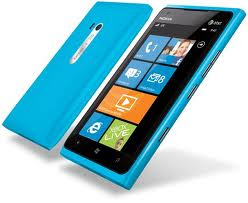
Nokia Lumia 800

0 comments


Specifications


  • Internet
    Amazing speeds, Bing, Internet Explorer 9, HTML5, Wi-Fi
  • Design
    4.3" AMOLED ClearBlack glass touchscreen, one-piece polycarbonate body, excellent antenna performance
  • Cameras
    8 MP main camera, Carl Zeiss optics, dual LED flash, Auto Focus, 1 MP front camera, video calling
  • Battery
    All day battery life, up to 8 hours talk time, up to 400 hours standby
  • Social
    Facebook, Twitter, LinkedIn, email, Chat, SMS

At a glance

  • 4.3 ''
    Display size
  • 8 megapixels
    Primary camera sensor size
  • 160 g
    Weight
  • 7 h
    Maximum 3G talk time
  • 300 h
    Maximum 3G standby time
  • 60 h
    Maximum music playback time
  • 8 h
    Maximum video playback time
 Available Colours
  1. Black
  2. Sky
  3. White

Google SketchUp 8.0.11752

0 comments


Google SketchUp is software that you can use to create 3D models of anything you like.
Get started right away.
Most people get rolling with SketchUp in just a few minutes. Dozens of video tutorials, an extensive Help Center and a worldwide user community mean that anyone who wants to make 3D models with SketchUp, can.
Model anything you can imagine.
Redecorate your living room. Design a new piece of furniture. Model your city for Google Earth. Create a skatepark for your hometown, then export an animation and share it on YouTube. There's no limit to what you can create with SketchUp.
Get models online for free.
You can build models from scratch, or you can download what you need. People all over the world share what they've made on the Google 3D Warehouse. It's a huge, searchable repository of models, and it's free.