



468x60 Ads

Buanglah sampah pada tempatnya. Pabila sampah tiada, kena ceria main warnet. Hary Irfantri, 2012
Demo image Demo image Demo image Demo image Demo image >

Advanced System Optimizer

0 comments

 
3.1.648.8480 Software + Serial Key | 10 MB

The Advance System Optimizer application was designed to be the easiest and most comprehensive way to keep your PC running smooth and error free.

Highlights of Advanced System Optimizer 3

>>Smart PC Care(New)

Smart PC Care feature of Advanced System Optimizer is aimed at carrying out multiple tasks with ease. Several tasks like junk file cleaning, registry cleaning, disk defragmentation etc. can be accomplished through a single click. This not only saves time but also makes the process of performing multiple tasks a breeze.

>>Driver Updater(New)

Driver Updater takes all of the tedious work out of keeping your system’s drivers up to date! By scanning your system, Driver Updater is able to automatically download and install the latest updates for all of the drivers for all of your components. Of course, you’ll be presented with a summary of all of your outdated drivers before Driver Updater goes to work – just select those that you want to update, and click!

>>Disk Tools(New)

Disk Tools performs diagnostic tests on your hard drive, informing you of any problem sectors and attempting to salvage any readable data that it finds in those bad sectors. Think about it - you may just think that you've lost an important file to a bad sector, but with Disk Tools, you may still be able to get it back!

>>PC Fixer(New)

PC Fixer scan your system, and it will present you with an easy-to-read summary list of common issues that negatively impact system performance and your user experience. The PC Fixer job list is sorted by category for your easy review - just click on a category like 'Control Panel' to see PC Fixer's recommended list of action items. Plus, if you're looking to fix or optimize a specific area, like your display settings, PC Fixer lets you search for specific items by keyword!

>>Undelete(New)

Undelete scans your entire system for deleted files and folders, giving you the opportunity to recover them as if they never left! Hard drives, partitions, external devices, even CD and DVD drives can be scanned for recoverable files by Undelete. You even have your choice of scan – just the Master File Table, for a quick scan, or a deeper scan which performs a sector-by-sector scan of the hard drive for file signatures.

>>Registry Cleaner

Registry Cleaner finds and removes unnecessary and invalid entries in your Windows registry, reducing system response time and minimizing the risk of problems when installing new software applications. By ensuring that your registry contains only those entries that are necessary to support currently installed hardware and software items, Registry Cleaner reduces the likelihood of data corruption due to conflicting registry entries.

>>Registry Optimizer

Registry Optimizer builds a fresh copy of the Windows registry using information contained in your existing registry. In doing so, Registry Optimizer supercharges your system's performance by removing fragmentation, gaps, and deleted registry entries. The result is a cleaner, leaner registry that takes up less disk space and consumes fewer memory resources.

>>System Cleaner

System Cleaner is specifically designed to identify these junk files that threaten to destabilize your system and compromise your identity. With System and Disk Cleaner, you are assured of the complete removal of these files, which are often missed by other utilities available in the market!

>>Disk Explorer

The Disk Explorer utility features a Windows Explorer-style interface that displays all of the available drives on your system on the left, and all of the folders contained in the selected drive on the right. With the intuitive pie chart graphic, you'll be able to see, at a glance, what types of files take up the most space on your disk. Have you ever wondered how much of your disk space is taken up by music files? With Disk Explorer, this is no longer a mystery! Want to clean up your drive and free up some space? Disk Explorer provides you with a handy list of the 100 largest files on the drive.

>>Uninstall Manager

Uninstall Manager is the easy way to review and uninstall applications from your system! With Uninstall Manager, you'll be provided with a complete list of all of the programs that are installed on the system, their descriptions, file sizes, and date installed. It's all the information that you need to make an informed decision whether to keep or remove a program.

>>Memory Optimizer

Memory Optimizer resolves the most common causes of system crashes and application freezes! Memory Optimizer’s colorful and intuitive memory graph shows you, at a glance, your total memory, available memory, used memory, and the resources that are used by the system cache. By constantly monitoring your system, Memory Optimizer is able to reclaim valuable memory resources, making them available for your applications and ensuring the continued health of your operating system. Applications will perk up, running faster and with greater stability. You can even specify how much memory Memory Optimizer should reclaim each time it runs, tailoring the memory allocation process to the way that you work!

>>Privacy Protector

Privacy Protector addresses this issue head-on! With Privacy Protector, your confidential information, including all traces of your usage history, is completely and securely erased from your machine. Not only does Privacy Protector minimize the risk of identity theft, it also improves your system performance by removing files that take up disk space and consume resources.

>>Secure Delete

Secure Delete keeps the privacy and security of your system intact. By implementing a secure deletion method developed by the United States Department of Defense, Secure Delete ensures that no tool can ever recover your deleted files and folders! By using Secure Delete to securely remove your sensitive files, deleted items are permanently removed from your system.

>>Secure Encryptor

Secure Encryptor allows you to encrypt your programs into a format that’s unreadable to anyone who doesn’t have the decryption password! With Secure Encryptor, you don’t even have to worry if someone copies your most important files – in their encrypted form, they are all but useless.

>>System File Backup & Restore

System Files Backup and Restore ensures that you’ll always have a working backup copy of your Windows system files. In fact, using System Files Backup and Restore, you’ll be able to maintain multiple copies of your system files from several different points in time, giving you the power to roll your system back to a specific date, before you were struck with the virus or file corruption. It’s a good idea to take a monthly snapshot of your system settings, or to create a backup before installing a new piece of hardware or software.

>>System & Security Advisor

System and Security Advisor is a unique tool that quickly scans your computer and provides you with helpful tips to improve your experience. With a single click, you'll be able to improve your system's performance by identifying the system settings that consume the most resources. The utility will also make recommendations on how to improve your system's security.

>>Duplicate Files Remover

Duplicate Files Remover thoroughly searches your hard disk and removes all duplicate files from your system, freeing up valuable disk space and increasing the efficiency of your file system.

>>Game Optimizer(New)

Game Optimizer provides you with a private virtual desktop that’s completely free of distractions – no music, no instant messaging, no other apps running except for your game. What’s more, Game Optimizer actually reallocates system memory, guaranteeing that your game will have plenty of resources, and ensuring that your gaming session will be free from plummeting frame rates, stuttering audio, and all of those other annoyances!

>>System Protector(New)

System Protector continually monitors the processes that are running on your PC for evidence of spyware-related activity. Using artificial intelligence, System Protector is capable of identifying, detecting, and cleaning malicious threats quickly and efficiently before they have an opportunity to do their dirty work.

>>Backup Manager(New)

Backup Manager lets you create different backup profiles, or jobs, each of which can be used to back up and restore specific files and folders. For instance, you could create one backup job to back up your photos, and another to back up your music, and yet a third that would back up a larger portion of your hard drive. All of your backups can be stored as space-saving ZIP archive files. Once you create a backup job, you can re-run that job at any time. Restoring data from backup is as easy as a few clicks.

>>Disk Optimizer(New)

Disk Optimizer solves the problem of data fragmentation, bringing a renewed level of responsiveness to your applications and reducing the time it takes for your computer to boot! With Disk Optimizer, all of the fragments of data are rearranged back to a sequential order on your hard drive, greatly improving data access times. Whenever you're experiencing sluggish application response times, slow boot and restart cycles, and a general decline in system performance, it's time for Disk Optimizer!

>>Startup Manager

Startup Manager is your key to effortlessly managing Windows Start-Up programs. Using the intuitive Explorer-like interface, just add the applications that you want to load when Windows boots, or review your existing Start-Up items to see if any can be removed. If you aren't sure about a specific item, you can also use Startup Manager to temporarily disable it to see the affect on your system. Startup Manager displays helpful descriptions of each of the items in your Start-Up programs list.

OS : Win XP/2000/Vista/Win 7
Language : English

Installation

1. Unpack
2. Install
3. Use Serial Key
4. Enjoy it!


Browse Software torrents

Advanced System Optimizer 3.1.648.8480 Software + Serial Key torrent


To download this torrent, you need a P2P BitTorrent client like Vuze or Miro.
Download Advanced System Optimizer 3.1.648.8480 Software + Serial Key torrent
Download

PowerDVD 12.0.1618.54

0 comments


PowerDVD


If you are looking for an program that brings support for all multimedia files that you have on your computer and gives you the ability to play and view your complete collection of music, videos and photos you need to consider PowerDVD that delivers fantastic tools for this purpose. Installation takes time and there will be a large number of components installed by this application, keep in mind that at the end it will offer you to install Google Toolbar but you can decline it because you do not need it for this application to work properly.
When you start this software product you will be greeted with a modern and nitely organized user interface that delivers all the main functions on colored tabs. After you add and open an file you will be getting all the necessary controls like start, pause, stop, etc.
There are large number of fantastic features that PowerDVD brings and you can use this application as a slideshow viewer, audio player with playlist, search scenes on a DVD, and much more. With integrated YouTube player you can search for videos from this video website and play it directly in this program
Among other features you will be getting CPU/GPU hardware acceleration that will also allow you to watch all your Blu-ray videos in fantastic quality. This is important because these movies are large and its reproduction needs a strong machine.
It would be a waste of time mentioning the formats supported by PowerDVD because this powerful application gets along with the majority of photo, video and audio formats on the market, not to mention that it’s a perfect tool to play HD content. Plus, it has the ability to work with multiple removable devices, including Apple and Android mobile phones and tablets.
If you need an powerful application that will enable you to watch and listen almost all files on your computer. With great looking interface and great tools PowerDVD is ideal choice and a must have program in your collection.

Free download PowerDVD 12.0.1618.54

Size: ~ 145 MB

Things you didn’t know VLC media player can do

0 comments

For most people, VLC is the favorite media player because it plays everything they throw at it without hiccups. No hunting for codec. But VLC can do a lot of other things as well. Find out how many of these listed below you knew, and how many you did not.
1. Rip DVDs: VLC includes a basic DVD ripper. You probably would never use it when there are better DVD rippers available, but it helps to know that you can in fact, get a decent quality DVD rip with VLC. To rip a movie follow these steps:
  • Go to the Media menu and choose Convert/Save. Click on the Disc tab.
  • Here you can adjust the Starting Position and rip only specific titles or chapters.
  • Enter file name making sure to end with .MPG, and start ripping.
  • Click Save.
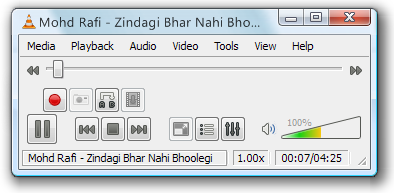
2. Record videos: With the new VLC, you can record videos during playback. The record button is hidden by default. To see it, click on View>Advanced Control. The record button will now appear. Clicking on the button while playing a movie or video will start recording. Clicking again will stop recording.
vlc-record
3. Play RAR files: Do you know VLC can play videos zipped inside RAR files? They play like normal video files and you can even use the seek bar. If the RAR file is split into several files, no problem. Just load the first part (.part001.rar ) and it will automatically take the rest of the parts and play the whole file.
4. Play in ASCII mode: VLC media player has an amusing ability, to playback movies in ASCII art. To enable ASCII mode, open VLC media player and click on Tools>Preferences. Open the section “Video” section and under “Output” select “Color ASCII art video output” from the drop down menu. Save it. Now play any video file to enjoy the ASCII art.
vlc-ascii2
5. Listen to online radio: VLC includes hundreds of Shoutcast radio stations. You just need to enable it through Media>Services Discovery>Shoutcast radio listings. Now, open the Playlist and browse through the stations.
vlc-shoutcast
6. Convert Audio and Video formats: In VLC you can convert video and audio files from one format to another. Several different formats are supported like MP4, WMV, AVI, OGG, MP3 etc. To access the converter:
  • Go to Media>Convert/Save.
  • Load the file you want to convert using the Add button and click Convert.
  • Now choose the output format and output file location.
    vlc-convert
7. Download YouTube and other online videos: First grab the URL of the YouTube video page. Now click on Media>Open Network stream. Paste the URL and click Play.
Once VLC starts streaming the video, click Tools>Codec Information and at the bottom of the window you will see a Location box. Copy the URL and paste it on your browser’s address bar. The browser will now download the file which you can save it to your hard disk. Alternatively, you can record the video. (See #2).

iMacsoft Free DVD Ripper For Windows is The Best You Can Get For Free

0 comments

iMacsoft Free DVD Ripper is a totally free DVD ripping program for Windows with features usually seen only in commercial products.
I have reviewed a fair number of DVD ripping programs in the past – a majority of them happens to be paid software. When compared to freeware DVD ripping programs, the commercial programs always had an edge over the free ones. They always had a better interface, had exhaustive support for media file formats and built in profiles for different portable devices and media players. I was eager to see a free DVD ripper that was at least half as decent as the paid ones.
imacsoft-dvd-ripper
iMacsoft Free DVD Ripper is not half as decent – it’s a full replacement for every expensive DVD ripping program out there. The software comes with fantastic support for portable devices, user configurable video settings, a video trimming tool, and other features which we shall see shortly.
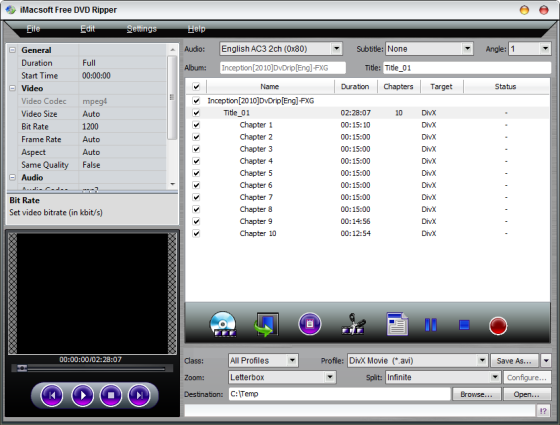
iMacsoft Free DVD Ripper can rip videos from either a physical disc, a disc image or a DVD folder on the hard drive. Just load the DVD or DVD folder into the program and it will automatically list all available titles and chapters on the disc. If the disc contains multiple angles, a feature typically found on porn DVDs, you can extract them too. No other DVD ripping program that I’ve tried till date offered this function.
imacsoft-dvd-ripper2
The next step would be to select the output video format. These are grouped into common video, common audio, iPhone, iPad, PS2, PS3, mobile phone, Windows mobile etc. Each of these groups contain multiple different formats. Practically, all video formats are supported.
If you intend on ripping a DVD and burning it again on to a disk, you can choose to split the video file into 650 MB, 700 MB, 4.7 GB or any custom sized chunks. The video trimming tool lets you set a start and end position on the video file, and only the marked segment will be ripped. This is useful to get rid of advertisement at the beginning of the video and end credits at the end. This in turn reduces the file size of the ripped video.
You can also choose the zoom level – letterbox, pan and scan or full.
On the left, is a small preview window which is basically a video player that lets you preview the video files before ripping. Above the preview window, you will find the video settings. These can be directly clicked on and edited. You can change the video size, bit rate, aspect ration, frame rate, and quality (variable or constants bit rate).
Once you have gone through the above steps, all that remains is to click on the red button to commence ripping.

Open Source Media Player Miro 5 Released

0 comments

MiroOpen source music, video and Internet TV player Miro 5 has just been upgraded to version 5. With this upgrade Miro brings several new features to the already rich media player such as a tool to lookup missing music information and album art, a means to cleanup their music library, download HD videos from Vimeo, faster device synchronization and conversion and support for purchasing music from eMusic.
Miro plays all your video and music in your local drive as well as stream videos from YouTube, Vimeo, Hulu, PBS, DailyMotion, 5min, Blip, Metavid and more. Miro can automatically download videos from RSS-based channels and add them to your library from where you can watch them later. Miro integrates an RSS news aggregator and podcatcher and a BitTorrent client.
miro

Then there is a built in Video Converter, that converts video based on FFmpeg with profiles for the Theora (.ogv), .mp4, and WebM video formats supported by various devices. Converted videos can be copied to your portable devices and mobile phones and the contents synchronized with those on your computer.
These are the stuff that is already available in Miro since version 4. With version 5, you get additional capabilities the most notable one is song information and album art lookup and music clean up which is done automatically by looking up the artist, correct title, and album name and artwork on the Echonest database. The album art comes from 7Digital.
Also added is eMusic to the music store which includes Amazon Music and Google Music.
Transferring of media files to playback devices has further improved as Miro 5 can now automatically sync files, and users can set what media type they would like Miro to fill the remaining space on their player with. The program can now also delete files from the device that have already expired in Miro. Another helpful addition is that Miro 5.0 will no longer convert videos to another format when the device it will be synced to actually supports the original format.
The programs core files also received “massive updates to the Windows backend”, from playback to GUI, display to libtorrent, everything is updated and upgraded.

0 comments

Download KMPlayer 3.2.0.19

KMPlayer 3.2.0.19

KMPlayer - 27.50MB (Freeware)
The KMPlayer is a versatile media player which can cover various types of container format such as VCD, DVD, AVI, MKV, Ogg Theora, OGM, 3GP, MPEG-1/2/4, WMV, RealMedia, and QuickTime among others. It handles a wide range of subtitles and allows you to capture audio, video, and screenshots in many ways.
The player provides both internal and external filters with a fully controlled environment in terms of connections to other splitters, decoders, audio/video transform filters and renderers without grappling with the DirectShow merit system. Internal filters are not registered to user's system to keep it from being messed up with system filters.
In December 2008 KMPlayer was bought by Pandora.tv, and continues to be made available as freeware.

0 comments

TweakNow PowerPack 2012 v4.1.0

Optimise, repair, tweak and tune your PC with this one-stop system management suite
Our Rating:
Your Rating:
Login to rate
Based on 1 ratings
License: Freeware
Operating Systems: Windows 7 (32 bit), Windows 7 (64 bit), Windows Vista (32 bit), Windows Vista (64 bit), Windows XP
Requirements:
Languages: English
Software Cost: Free
Date Updated: 19 April 2012
Watchlist: Add download to my watchlist
Downloads To Date: 2062
Developer: TweakNow
RSS News Feed:
Buy TuneUp Utilities 2012 for only $14.99, with lifetime license, saving 70% from MSRP, only from store.downloadcrew.com
TweakNow PowerPack 2012
Keep your PC in peak condition
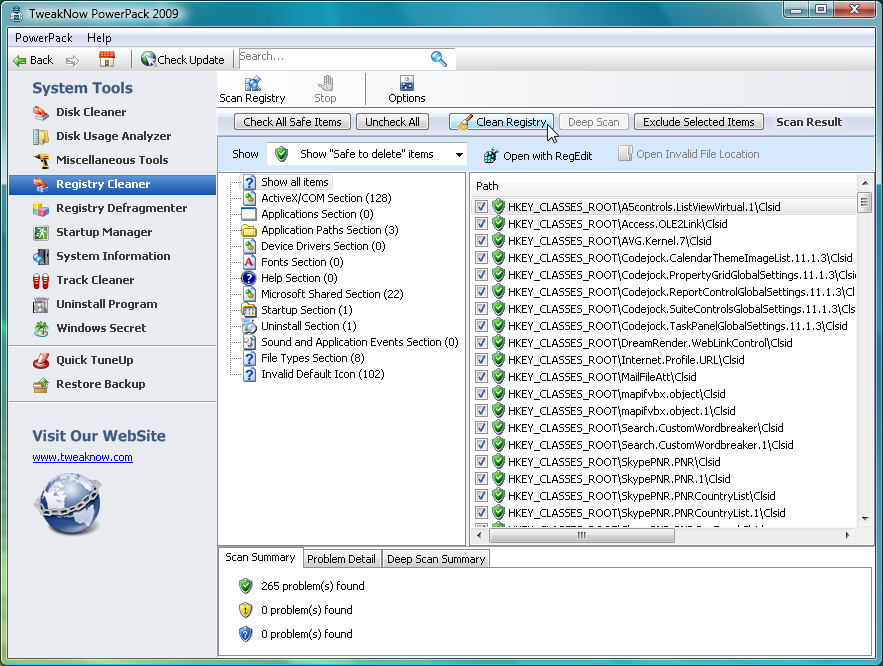
Keeping your PC in peak condition normally requires installing a whole library of utilities, learning their individual quirks and hoping that they'll somehow all work together. But there is a simpler alternative. TweakNow PowerPack 2009 provides all the PC management and tweaking tools you need through one straightforward interface, so there's no wasted time, no software conflicts - you just get to work immediately with the utility you need.
If hard drive space is short, for instance, then the Disk Usage Explorer will reveal the most bloated folders, helping you to quickly address the problem. Or you could just set the Disk Cleaner to work, finding and deleting any redundant files that are cluttering your hard drive.
If you're more worried about performance then turn to the Startup Manager, which helps you control exactly which programs launch when Windows boots. Your Registry is kept in order with a Cleaner and Defragmenter, while a RAM Optimizer frees up memory when you need it.
Anyone concerned about privacy will appreciate the Track Cleaner, which removes the application history for browsers (IE, Firefox, Chrome), Explorer, Windows Media Player, Microsoft Office, and more.
You also get a complete Windows tweaking tool, that lets you change everything from Windows memory management strategies, to your network settings, Start menu appearance and more.
And there are still more tools that don't fit easily into other categories, like an auto shutdown module (turn off your PC at a given time) and a virtual desktop (have up to 4 desktops available and switch between them with a system tray icon).
PowerPack 4.1.0 adds these new features:
-Windows Cleaner -> Disk Usage Analyzer: Improved disk scan engine performance.
-Windows Cleaner -> Disk Usage Analyzer: Added report for common files (bmp, png, jpg, wav, etc) found during disk scan process.
-General: minor improvements and bug fixes.

0 comments

Penjelasan tentang Rundll32.exe, Kerusakan dan Cara Memperbaikinya.

rundll32.exeApa itu rundll32.exe? Itulah pertanyaan pertama yang harus kita pahami jawabannya sebelum kita bisa memperbaiki kerusakan pada file ini. Proses rundll32.exe adalah bagian dari OS Windows yang bertanggung jawab untuk menjalankan DLL dan menempatkan libraries dalam memori. Proses rundll32.exe dikenal sebagai program utilitas command line, dan melakukan fungsinya terintegrasi bersama dengan file rundll.exe. Rundll32.exe bekerja dengan menerapkan suatu fungsi yang diekspor dari modul DLL yang spesifik yaitu 16bit atau -32-bit. Proses rundll32.exe adalah pengembangan dari Run DLL.
Fungsi rundll32.exe merupakan program internal yang digunakan oleh Windows untuk menjalankan program-program internal lainnya yang belum dikenal sebagai DLL (dynamic link libraries) yang dibutuhkan oleh sistem operasi dan program-program anda (misalnya Word, Outlook, Internet Explorer, OpenOffice, Thunderbird, Firefox, atau apapun agar berfungsi). Program-program seperti ini dibebankan kepada DLL dan dibawah ke dalam memori dan kemudian memicu fungsi tertentu dari modul DLL.
Mengapa Rundll32.exe bisa error?
Error pada Rundll32.exe biasanya terjadi dalam menanggapi ketidakmampuan Windows untuk mengakses aplikasi, program atau file sebagai hasil dari sebuah file (Dynamic Link Library) yang rusak atau hilang atau sebagai respons terhadap adanya virus rundll32.exe yang dirancang untuk terlihat seperti sebuah proses Windows yang normal. Penyebab yang lain dari kerusakan rundll32 adalah karena proses install dan uninstall yang tidak sempurna sehingga menyebabkan system jadi crash.
Bagaimana mengatasi Rundll32.exe Errors
Ada beberapa cara yang dapat ditempuh untuk memperbaiki kerusakan ini;
  1. Cara otomatis dengan software. Cara mudah untuk memperbaikinya adalah dengan menggunakan sebuah software yang disebut sebagai RegCure Registry Cleaner. Sayangnya bahwa software ini berbayar dan saya pikir anda pasti akan menghindari ini.
  2. Dengan cara manual, yaitu dengan mengerjakan beberapa langkah-langkah perbaikan.
  3. Jika sudah sangat buntu, jalan terakhir adalah install repair atau install total.
Hot to Fix the “Windows Cannot Find C:WindowsRundll32.exe” Error
  1. Kadang-kadang ketika file rundll32.exe hilang, corrupted atau terinfeksi virus, anda mungkin mendapatkan pesan seperti ini: “Windows cannot find C:WindowsRundll32.exe. Make sure you typed the name correctly and try again”.
  2. Pertama-tama, scan komputer Anda dengan program antivirus yang handal untuk menyingkirkan setiap infeksi virus yang mungkin ditemukan. Namun, jika sebuah file rundll32.exe hilang atau rusak yang menyebabkan masalah, coba dulu mencari file rundll32.exe di folder C:Windowssystem32dllcache. Jika masih ada di sana, silakan copy dan pindahkan ke lokasi C:Windowssystem32.
  3. Jika dalam folder dllcache juga tidak ada, silakan cari di C:WindowsSericePackFilesi386 dan copy ke tempat yang saya maksud diatas.
Jika 3 langkah diatas masih gagal, lakukan proses berikut ini;
  1. Masukkan disk installer Windows kedalam CD/DVD ROM drive.
  2. Klik [Start] dan pilih [Run…].
  3. Ketik; [expand f:i386rundll32.ex_ c:windowssystem32rundll32.exe] dalam box Run tadi lalu tekan [Enter] maka proses peng-copy-an akan berjalan
  4. Setelah proses 3 diatas selesai, reboot computer anda dan tes hasilnya.
  5. Proses selesai dan the problem should be solved.
Catatan:
  1. Adakalanya ketika file rundll32.exe terinfeksi virus, justru computer tidak mau shutdown. Cara mengatasinya adalah delete dulu file rundll32 yang terinfeksi virus lalu copy kembali dari cd installer.
  2. Seharusnya setelah cara kedua diatas selesai, maka masalah akan hilang. Tetapi jika karena sesuatu hal tidak juga selesai, maka jalan berikut yang bisa ditempuh adalah install repair atau instalasi total system operasi.